My Billing Info
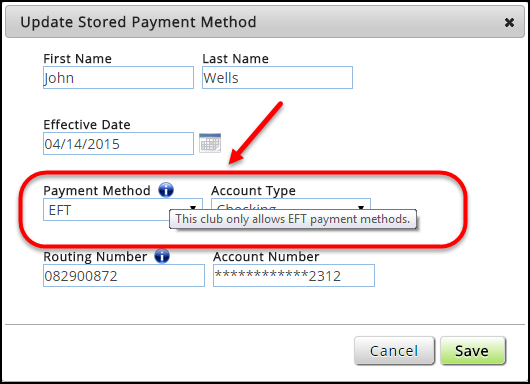
If the payment method is restricted, the information  icon will appear next to the Payment Method field in the Update Stored Payment Method dialog box. When the member hovers over or clicks the icon, a message will appear indicating which type of payment method is allowed.
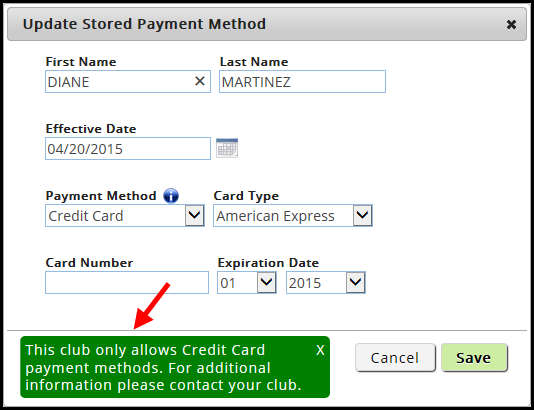
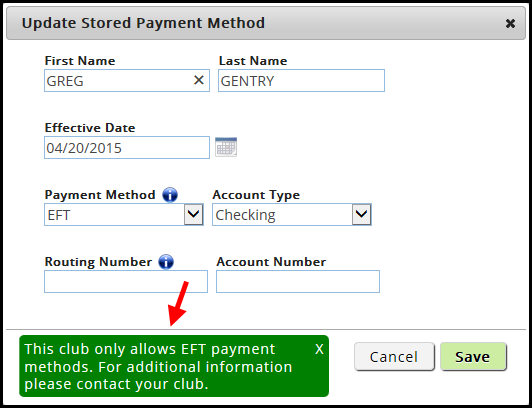
If a member has a stored payment method that is now restricted, a green box will appear at the bottom of the dialog box with a message indicating which payment method the club allows.
EFT Only
For EFT Only, the message states: This club only allows EFT payment methods. For additional information please contact your club.
- The following is an example of the information icon and EFT Only message.
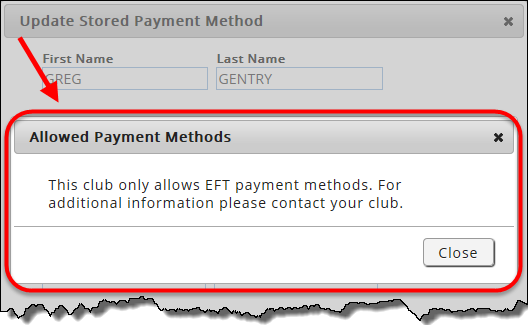
- When the member clicks the information icon or attempts to save a restricted payment method, a pop-up message will appear as shown below.
- If a member has a stored payment method that is now restricted and attempts to update it, the information message will appear as shown below.
Credit Card Only
For Credit Card Only, the message states: This club only allows Credit Card payment methods. For additional information please contact your club.
- The following is an example of the information icon and Credit Card Only message.
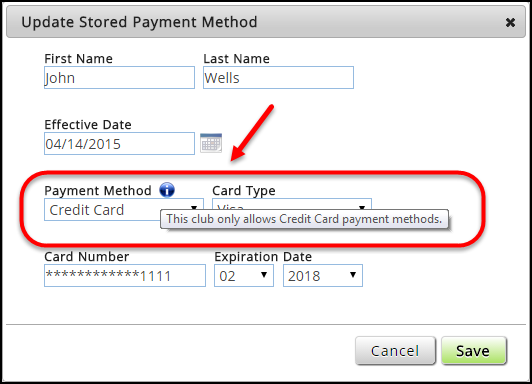
- When the member clicks the information icon or attempts to save a restricted payment method, a pop-up message will appear as shown below.
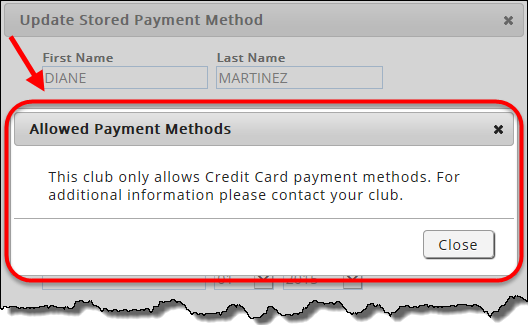
- If a member has a stored payment method that is now restricted and attempts to update it, the information message will appear as shown below.