DataTrak 2.137.0 Release Notes
The following is an overview of this release:
|
Release Date: |
Thursday, February 2, 2017 |
|
Release Number: |
2.137.0. |
|
Enhancement: |
|
| Fixed Issues: |
|
Agreement Queue
New Option: Convert to Prospect
When you deactivate a member account, you can now maintain a record of the member's personal information by converting the member to a prospect. Use this feature if you would like to market to former members or maintain information for potential future business.
Security Role Updates
A new security role was added, allowing users to convert a member to a prospect (Member Security>Edit Agreement>Convert Member to Prospect-Perform). The correct security role settings must be in place to complete this task.
Additionally, the security role title has been updated for deactivating a member account (Member Security>Edit Agreement>Deactivate Member-Perform).
How to Convert a Member to a Prospect
From the Agreement Queue, click X to remove the account from the queue.
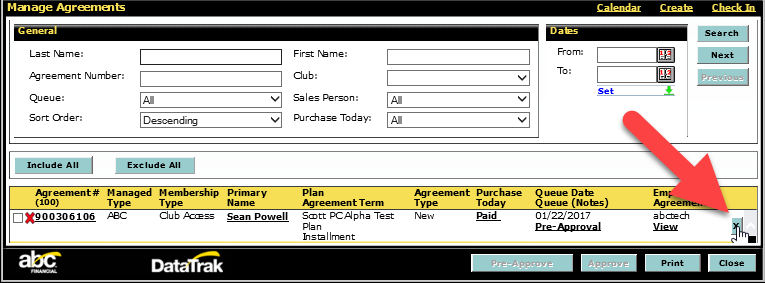
A dialog box will appear with membership options. You can deactivate the account or convert the member to a prospect.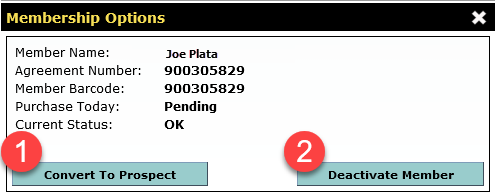
- Convert to Prospect - The account will be removed from the agreement queues but the member's personal information will remain in the system in the form of a prospect account.
- If the account was converted from prospect status upon enrollment, the previous prospect settings will be restored.
- If the account is going to be a prospect for the first time, the club's default prospect settings (found under club settings) will be applied.
- Deactivate Member - This action deactivates the account and removes the member's information.
If the account is not the primary account or has secondary members, active recurring services, or pending POS transactions, a warning will appear. You must address the conflict before converting a member to a prospect.
If you proceed with converting the member to a prospect without resolving active recurring services or pending calendar events, these items will be cancelled.
When a member is converted to prospect, a note will be added to the member's profile.

Removed Queue
Logic Update
New and converted members will no longer appear in the Removed Queue. Only rewritten, renewed, or upgraded/downgraded agreements will be placed in the Removed Queue. This safeguards our ability to accurately collect member dues, as all agreements in the Removed Queue are reverted to their original state when the day-end cycle runs. Including new agreements could cause billing issues, as they do not have an original state to revert back to. You can use the Deactivated Members report or member notes to view activity for new and converted agreements.
Member Page, Personal Tab
Display Update
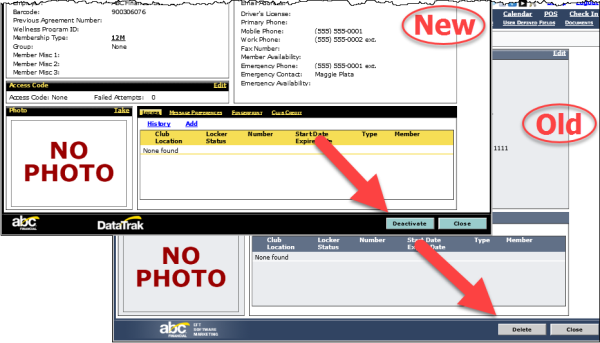
On the Personal tab of the Member page, the Delete button has been renamed Deactivate. The button's function has not changed.