Editing Credit Card Payment Options
To edit credit card payment options
- On the Billing tab in the Payment Options section, click the desired Payment Option link.
The Payment Option dialog box appears. Notice that the Payment Method, Card Type, and Credit Card Number fields are disabled and cannot be edited.
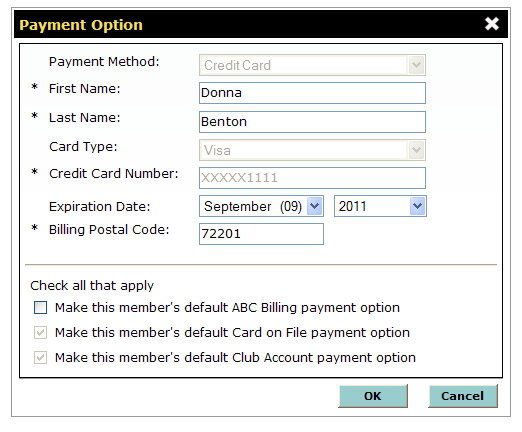
- If necessary, change the card holder’s First Name.
- If necessary, change the card holder’s Last Name.
- Select the new Expiration Date month and year.
You cannot save updates to a credit card’s information if the expiration date is expired and is not updated.
- To make this card the default ABC Billing, Card on File, or Club Account payment option, click the appropriate check box.
If you need to change the Credit Card Number or any other fields that are disabled, you will need to create a new payment option with the corrected information. See Adding a Credit Card.
You cannot uncheck a credit card payment option that is mapped to either ABC Billing or Club Account. In order to select or choose another a payment option that is mapped to either ABC Billing or Club Account, you must do one of the following:
- Go to the either the ABC Membership or Club Account section and click Change Payment Option for ABC Billing or click Edit for Club Account to select a different payment option.
- In the Payment Options section, click Add a New Payment Option and click the service for which the payment option will be used.
 © 2024 ABC Fitness Solutions, LLC.